AI Agent for SREs: MCP Servers + Gen AI Studio on OpenShift AI
How I built an operations assistant with 4 MCP Servers (Prometheus, Alertmanager, Kubernetes, Red Hat KB) using Gen AI Studio on OpenShift AI 3.2.
Jean Paul López

The Problem: Too Many Tools, Too Little Time
Troubleshooting in OpenShift means constantly jumping between tools: Prometheus for metrics, Alertmanager for alerts, kubectl for resources, and the Red Hat Knowledge Base for solutions. Each context switch wastes valuable time and increases the chance of missing something critical.
What if you could query all these sources from a single conversation?
That’s exactly what an AI agent with MCP Server access enables. In this article we’ll build an operations assistant that can:
- Query Prometheus metrics
- Review and silence Alertmanager alerts
- Interact with Kubernetes resources
- Search for solutions in the Red Hat KB
All using the new Tech Preview features from Red Hat OpenShift AI 3.2.
What is Red Hat OpenShift AI?
Before diving into details, let me explain what OpenShift AI is for those who don’t know it.
Red Hat OpenShift AI is Red Hat’s artificial intelligence platform built on top of OpenShift. In simple terms: it’s where you can develop, train, serve, and manage AI models in an enterprise-grade way.
Why does it matter? Because having an AI model isn’t enough — you need:
- Infrastructure to run it (GPUs, storage, networking)
- Tools to experiment (notebooks, pipelines)
- Governance to control access
- Observability to know what your model is doing
- Integration with your enterprise stack
OpenShift AI gives you all of this on top of Kubernetes.
The Big Evolution: From RHOAI 2.x to 3.x
If you’ve been following OpenShift AI, you know that version 3.0 (late 2025) brought a significant philosophical change.
RHOAI 2.x (2023-2025)
- Focused on traditional MLOps: notebooks, pipelines, model serving
- Main interface: Open Data Hub Dashboard
- Model serving with KServe and ModelMesh
- Data Science Pipelines based on Kubeflow
RHOAI 3.x (2025-present)
- New vision: Agentic AI and Enterprise Generative AI
- Two new experiences:
- AI Hub — For Platform Engineers (catalog, registry, deployments)
- Gen AI Studio — For AI Engineers (playground, experimentation, MCP)
- Native support for Llama Stack API
- Integration with Model Context Protocol (MCP)
The key difference: RHOAI 2.x helped you train and serve models. RHOAI 3.x helps you build AI agents that can reason, plan, and act.
Tech Preview in RHOAI 3.2: What I Used
Red Hat releases new features as Technology Preview before they’re fully supported. In my experiment I used several of them:
| Feature | Status | What It Does |
|---|---|---|
| Gen AI Studio | Tech Preview | Playground for experimenting with models and MCP |
| AI Hub | Developer Preview | Dashboard for managing AI assets |
| Llama Stack | Developer Preview | Unified API for RAG, safety, tool calling |
| MCP Servers | Developer Preview | Protocol for connecting LLMs to tools |
How to Enable Gen AI Studio
In my case, with RHOAI 3.2.0, Gen AI Studio was already enabled. But if you need to enable it manually, you must modify the DataScienceCluster:
apiVersion: datasciencecluster.opendatahub.io/v1
kind: DataScienceCluster
metadata:
  name: default-dsc
spec:
  components:
    dashboard:
      managementState: Managed
      devFlags:
        manifests:
          - uri: https://github.com/opendatahub-io/odh-dashboard/tarball/main
            contextDir: manifests
            sourcePath: overlays/odh
To verify Gen AI Studio is enabled, check the DSCInitialization:
oc get dsci default-dsci -o yaml | grep -A5 genAiStudioYou should see:
genAiStudio:
  managementState: Managed
My Stack: 4 MCP Servers + Llama 3.2 + Gen AI Studio
The Environment
| Component | Details |
|---|---|
| OpenShift | 4.20.12 |
| RHOAI | 3.2.0 |
| Node | SNO g6.4xlarge (16 vCPU, 64GB RAM, NVIDIA L4) |
| Model | Llama 3.2 3B Instruct (vLLM, tool calling enabled) |
The 4 MCP Servers
- Prometheus MCP Server (11 tools) — Query metrics, diagnose nodes, investigate pods
- Alertmanager MCP Server (12 tools) — View alerts, create silences, investigate incidents
- Kubernetes MCP Server (23 tools) — List pods, view logs, execute commands, manage resources
- Red Hat KB MCP Server (5 tools) — Search solutions, troubleshoot errors, query documentation
Total: 51 tools available to the agent.
Step 1: Deploy the Model with Tool Calling
The first thing was to deploy Llama 3.2 3B with KServe, enabling tool calling. This is critical — without tool calling, the model can’t use MCP tools.
apiVersion: serving.kserve.io/v1beta1
kind: InferenceService
metadata:
  name: llama-32-3b-instruct
  namespace: my-first-model
  labels:
    opendatahub.io/genai-asset: "true"  # Required for Gen AI Studio
spec:
  predictor:
    model:
      modelFormat:
        name: vLLM
      runtime: vllm-runtime-cuda
      storageUri: oci://quay.io/modh/llama-3.2-3b-instruct:latest
      args:
        - --enable-auto-tool-choice        # Enables tool calling
        - --tool-call-parser=llama3_json   # Parser for Llama 3
        - --max-model-len=8192
    resources:
      limits:
        nvidia.com/gpu: 1
      requests:
        memory: 16Gi
        cpu: 4
Once deployed, we verify it appears in Gen AI Studio:
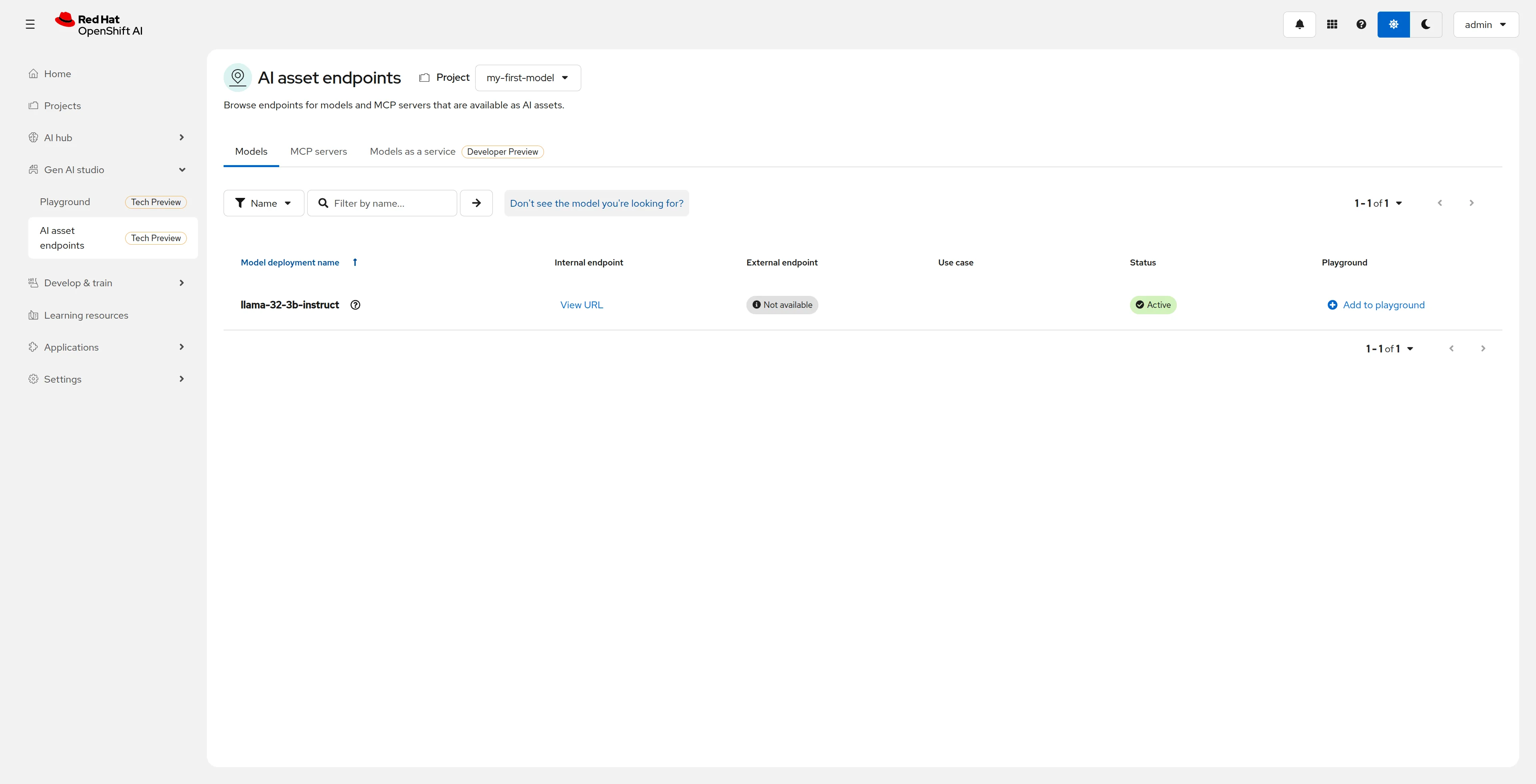 The Llama 3.2 3B model shows up with “Active” status in Gen AI Studio.
Step 2: Deploy the MCP Servers
I used Helm charts to deploy the 4 servers. Here’s the configuration for each one:
Prometheus MCP Server
helm install mcp-prometheus ./mcp-prometheus/charts/mcp-prometheus \
  -n mcp-servers \
  --set openshift=true \
  --set prometheus.namespace=openshift-monitoring \
  --set prometheus.service=prometheus-operated \
  --set prometheus.servicePort=9090 \
  --set prometheus.serviceScheme=https
Alertmanager MCP Server
helm install mcp-alertmanager ./mcp-alertmanager/charts/mcp-alertmanager \
  -n mcp-servers \
  --set openshift=true \
  --set alertmanager.namespace=openshift-monitoring \
  --set alertmanager.service=alertmanager-operated \
  --set alertmanager.servicePort=9093 \
  --set alertmanager.serviceScheme=https
Kubernetes MCP Server
helm install kubernetes-mcp-server ./kubernetes-mcp-server/charts/kubernetes-mcp-server \
  -n mcp-servers \
  --set openshift=true \
  --set rbac.extraClusterRoleBindings[0].name=cluster-admin \
  --set rbac.extraClusterRoleBindings[0].roleRef.name=cluster-admin \
  --set rbac.extraClusterRoleBindings[0].roleRef.external=true
Red Hat KB MCP Server
# First create the secret with your Red Hat token
oc create secret generic mcp-redhat-kb-secret \
  -n mcp-servers \
  --from-literal=REDHAT_TOKEN=your-token-here

helm install mcp-redhat-kb ./mcp-redhat-kb/charts/mcp-redhat-kb \
  -n mcp-servers \
  --set openshift=true \
  --set redhat.existingSecret=mcp-redhat-kb-secret
Step 3: Register MCP Servers in Gen AI Studio
Here’s the interesting part. Gen AI Studio discovers MCP servers through a ConfigMap in the redhat-ods-applications namespace:
apiVersion: v1
kind: ConfigMap
metadata:
  name: gen-ai-aa-mcp-servers
  namespace: redhat-ods-applications
data:
  Prometheus-MCP-Server: |
    {
      "url": "https://mcp-prometheus-mcp-servers.apps.ocp.example.com/sse",
      "description": "MCP server for querying Prometheus metrics"
    }
  Alertmanager-MCP-Server: |
    {
      "url": "https://mcp-alertmanager-mcp-servers.apps.ocp.example.com/sse",
      "description": "MCP server for managing Alertmanager alerts"
    }
  Kubernetes-MCP-Server: |
    {
      "url": "https://kubernetes-mcp-server-mcp-servers.apps.ocp.example.com/sse",
      "description": "MCP server for managing Kubernetes/OpenShift resources"
    }
  RedHat-KB-MCP-Server: |
    {
      "url": "https://mcp-redhat-kb-mcp-servers.apps.ocp.example.com/mcp",
      "description": "MCP server for searching the Red Hat Knowledge Base"
    }
Important note about endpoints: Go servers use /sse, while the Red Hat KB server (Java) uses /mcp. This is due to differences in MCP transport (SSE vs Streamable HTTP).
The “Token Required” Problem
When I first registered the servers, the Kubernetes MCP Server showed “Token Required”:
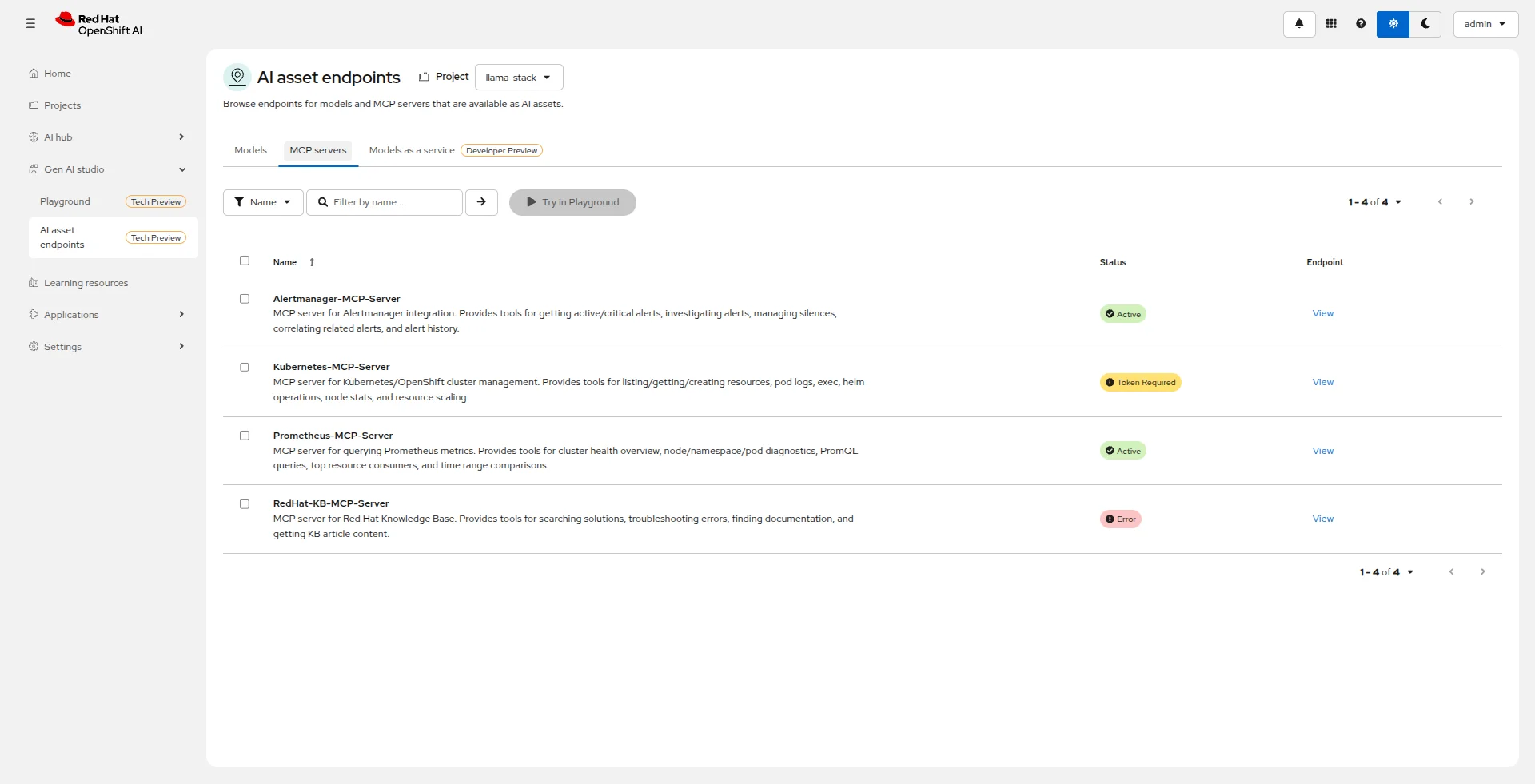 The Kubernetes MCP Server showed “Token Required” — an MCP transport issue.
The problem was that I was using /sse but Gen AI Studio expected /mcp for Streamable HTTP. The solution was to verify which transport each server uses:
# To verify the correct transport
curl -X POST https://your-mcp-server.apps.example.com/sse
curl -X POST https://your-mcp-server.apps.example.com/mcp
After the fix, all servers show as “Active”:
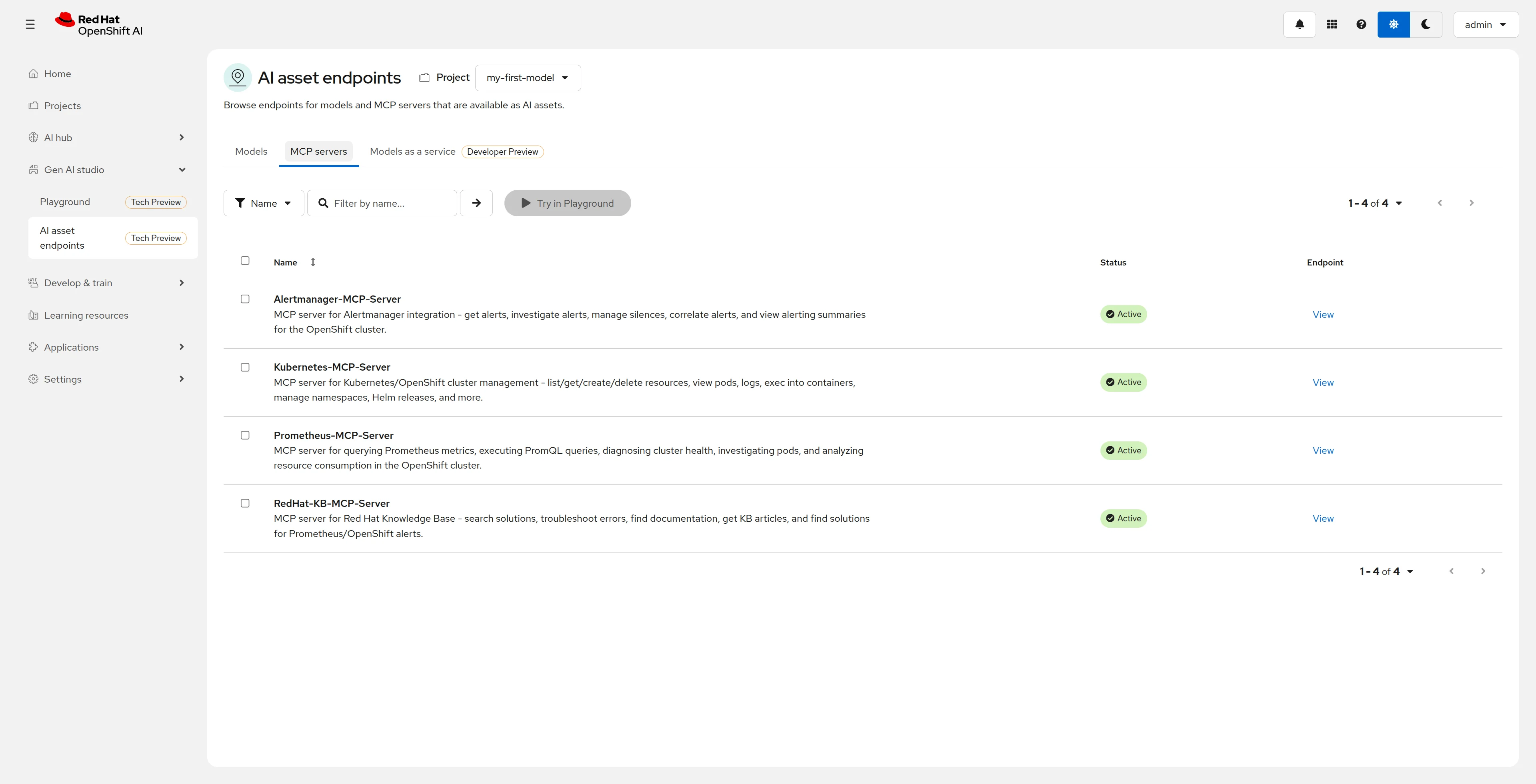 All 4 MCP servers registered and active in Gen AI Studio.
Step 4: Testing the Playground
With everything configured, it was time for the moment of truth. I opened the Gen AI Studio Playground and connected all 4 MCP servers:
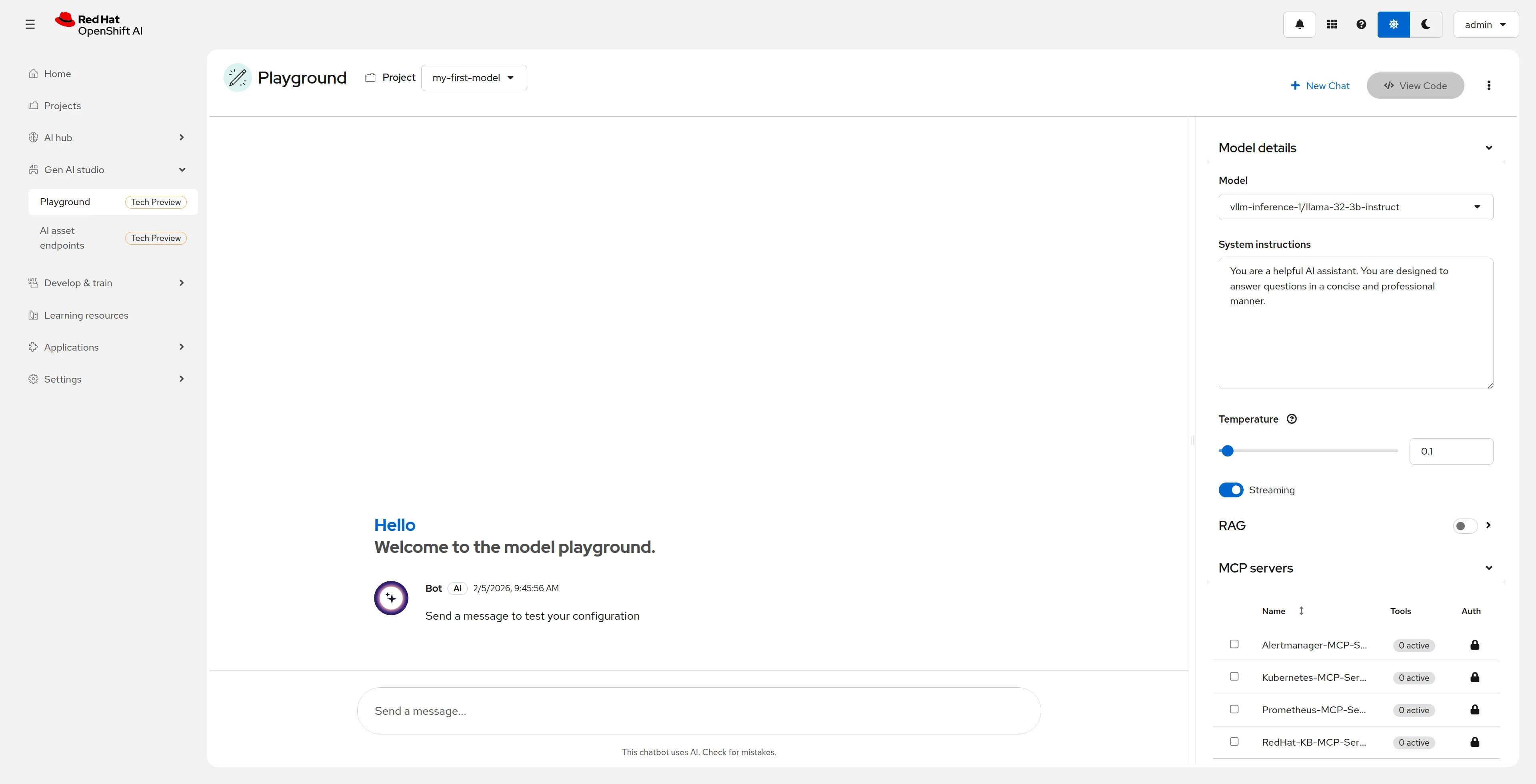 The Playground with all 4 MCP servers available to connect.
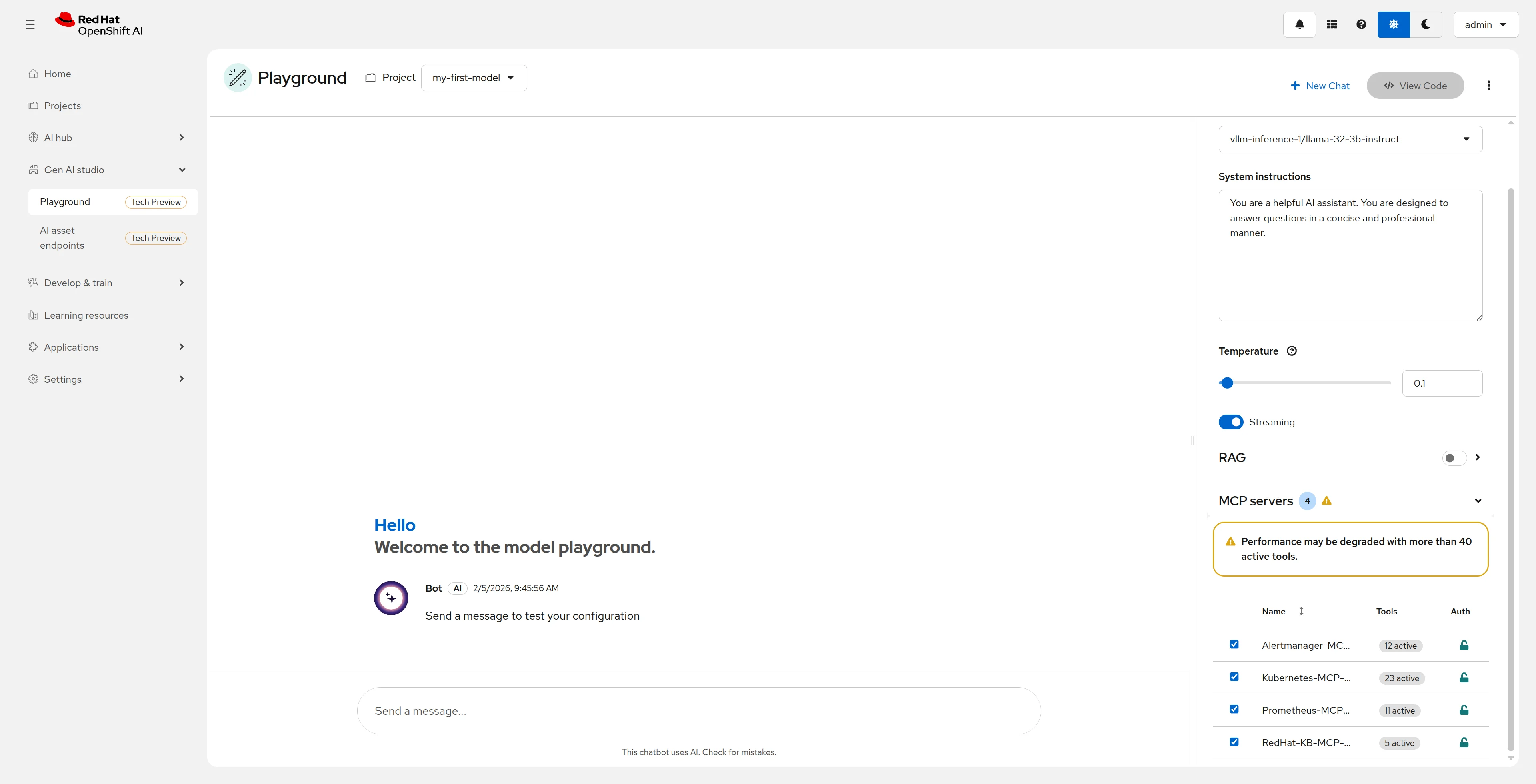 51 active tools — Gen AI Studio warns about performance impact.
The warning is real: With 51 tools, the 3B parameter model has to process a lot of information with each request. For production, I’d recommend an 8B+ parameter model.
What Can You Do With This?
This is the exciting part. With this setup, you can ask the agent things like:
Cluster Diagnostics
“What’s the health status of the cluster? Are there any critical alerts?”
The agent:
- Queries
getClusterHealthOverviewfrom Prometheus - Gets
getCriticalAlertsfrom Alertmanager - Gives you a summary with recommendations
Problem Investigation
“Pod X is in CrashLoopBackOff. What’s happening?”
The agent:
- Uses
pods_getto see the pod status - Queries
pods_logto see the logs - Searches
investigatePodfrom Prometheus for metrics - Looks for solutions in
troubleshootErrorfrom Red Hat KB
Guided Operations
“I need to silence the KubePodCrashLooping alert for 2 hours while I investigate”
The agent:
- Uses
createSilencein Alertmanager - Confirms the silence was created correctly
The SRE Dream
Imagine a system that:
- Detects an alert in your cluster
- Diagnoses the problem by querying metrics
- Searches for solutions in the Red Hat KB
- Executes corrective actions (with approval)
- Reports what it did
This is Agentic AI applied to operations. And OpenShift AI 3.x is building the infrastructure to do it in an enterprise way.
Lessons Learned
1. Model Size Matters for Tool Calling
A 3B parameter model with 51 tools is challenging. Sometimes the model gets confused about which tool to use. For production, use 8B+ parameters.
2. MCP Transport Isn’t Uniform
/sse vs /mcp — always verify the correct transport. Go servers typically use SSE (GET), while others use Streamable HTTP (POST).
3. SNO Has Limited Resources
On a Single Node OpenShift, CPU is the bottleneck. The model competes with MCP servers for resources. Plan your resource requests carefully.
4. Gen AI Studio Is Maturing Fast
It’s Tech Preview, but already very functional. MCP server integration works well and the UI is intuitive.
5. Logs Are Your Friend
When something doesn’t work, MCP server logs are invaluable:
oc logs -f deployment/mcp-prometheus -n mcp-serversWhere OpenShift AI Is Heading
Red Hat has an ambitious roadmap for MCP and Agentic AI:
- MCP Catalog in AI Assets — MCP servers will appear in the catalog alongside models
- MCP Registry — Version management, security scanning, certification
- MCP Gateway — Policies, rate limits, centralized logging
- MCPaaS (MCP-as-a-Service) — Centralized hosting of MCP servers
- Native MCP Servers — For OpenShift, Ansible, RHEL, Lightspeed
The vision is clear: enterprise infrastructure for AI Agents.
Coming Next: kagent, kmcp and More
This article focused on Gen AI Studio and “traditional” MCP servers. But there’s more in the ecosystem:
- kagent — Kubernetes framework for running AI agents as native workloads
- kmcp — MCP implementation on Kubernetes with CRDs and operators
- Llama Stack on OpenShift — Native deployment of Meta’s API for agents
In an upcoming article I’ll be exploring these tools and how they integrate with what we built here. The idea is to have an agent that can not only query information, but also take automated actions safely.
Stay tuned!



Comments (0)